Every service round provable: the digital cleaning record via QR code, with guest feedback.
A QR sticker replaces the paper sheet, whether restroom, office or whole floor, whether cleaning, checks or inspections: staff confirm each service round with one click, guests report problems on the spot at the same place, and service managers see everything in real time. No app, no training.
How a service round plays out in practice
1Complete, check off, sign
The staff member scans the QR code in the room, sees their tasks in their own language, checks them off and signs on the display.
2Rate and report
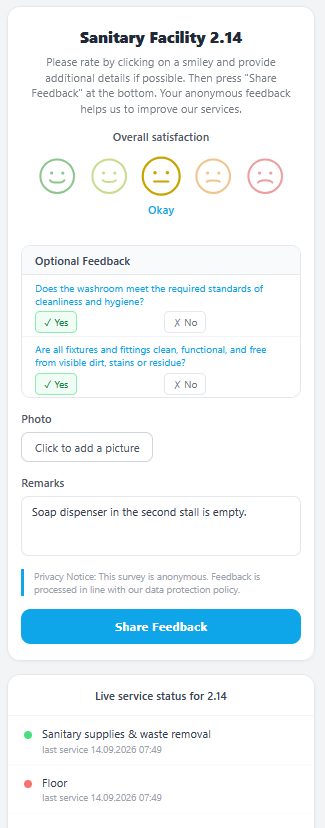
Guests scan the same code, give a smiley rating and report what is missing in seconds. Anonymous and with no sign-up.
3Respond and document
Reports land in the dashboard right away and are assigned with one click. For audits, there is still the familiar control sheet as a monthly overview.
Shown here for restroom cleaning. ScanQM works the same way for Grounds care, winter service, janitorial rounds, maintenance and inspections, security patrols, waste collection and any other service with fixed tasks.
The problem: no transparency, no feedback channel, complaints arrive too late
Service managers can't tell in real time whether cleaning rounds actually happened, and guests have no way to report problems on the spot.
Paper lists are unreliable
Sheets go missing, get forgotten or are filled in afterwards. A dependable record is hard to get.
No view of the present
Whether an area was cleaned today is often only discovered afterwards, if at all.
Guests have no channel
If soap is missing or something is broken, there's no way to report it on site. Complaints arrive too late.
Example: the digital restroom cleaning log
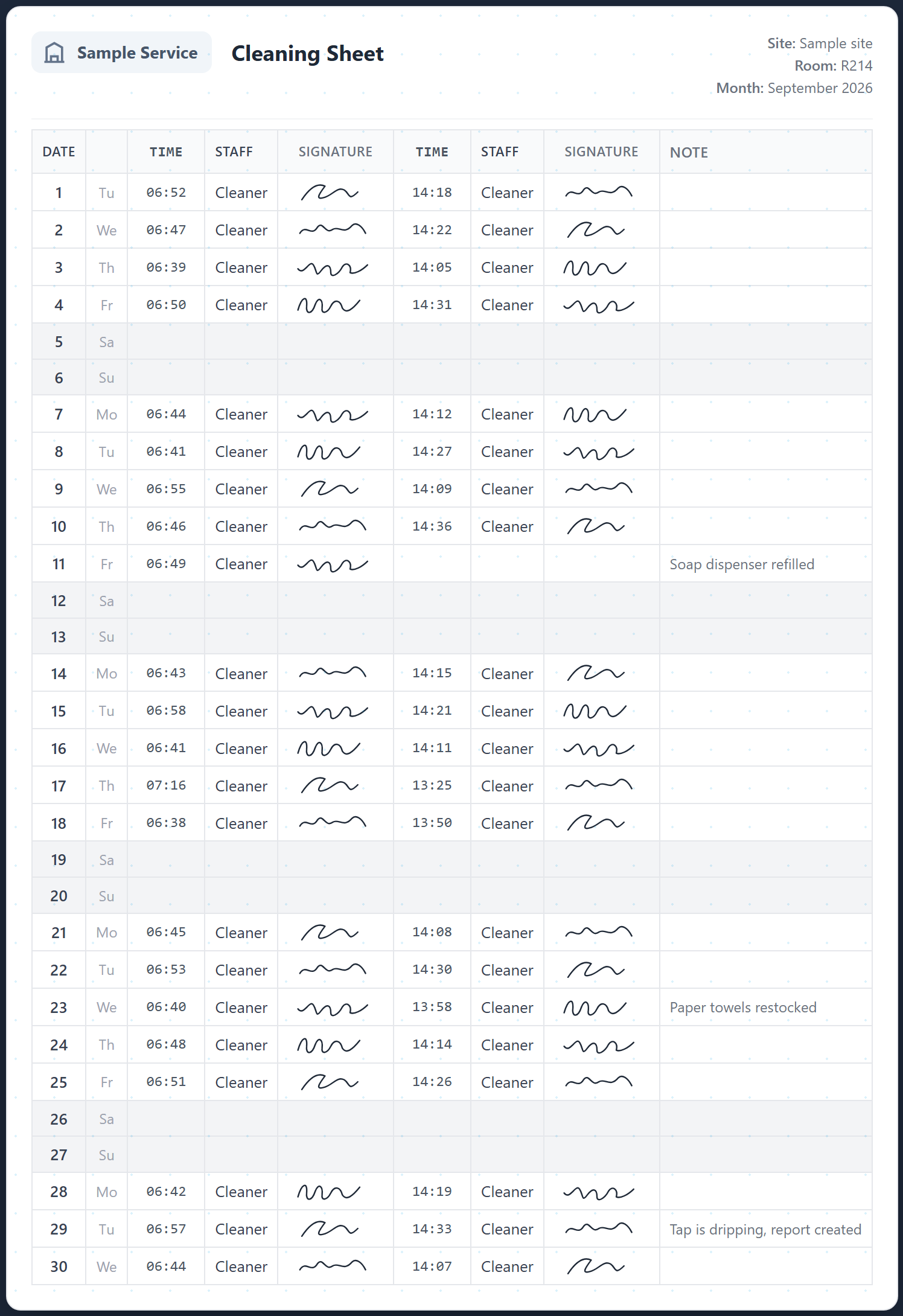
It replaces the checklist in restrooms, changing rooms and public areas, ready to use immediately with a QR sticker. The same principle applies to any recurring service.
- Staff scan the QR code and confirm the service round with one click
- Optionally with photo, signature and status note
- Who, when, where: instantly visible in the system and tamper-proof
- Service record as PDF at the push of a button, with logo, signatures and photos
- No app download and no training required for end users
Not just restrooms, not just cleaning
ScanQM turns any recurring task into a documented, traceable workflow, whether it's cleaning, equipment checks, safety rounds or a customer-facing service.
- Restrooms & changing rooms
- Offices & meeting rooms
- Hotel rooms & floors
- Vacation rentals
- Equipment checks
- Safety rounds
- Customer-facing services
In detail: replacing the restroom cleaning log digitally, the digital cleaning record and cleaning records for vacation rentals
Guest feedback on the spot, through to a documented resolution
Guests scan the same QR code and give feedback immediately. The team is notified in real time and documents the follow-up, so the loop from problem to solution stays closed.
- Rating and comment in seconds, no app, no login
- Real-time email notification to configurable recipients, with context and photo
- Add a resolution note straight from the email, via link, no login
- Every piece of feedback stays traceable until it's resolved
Everything for proof, feedback and control
From the QR scan to the exportable service report, on one platform.
Described in detail for facility management and cleaning companies.
QR check-in per zone
Every room, floor and area gets its own QR code. A scan records who, when, where, optionally with task list, photo and comment.
Service reports without QR scan
Staff can report faults, damage or anomalies on the go via the app, with free text and a photo.
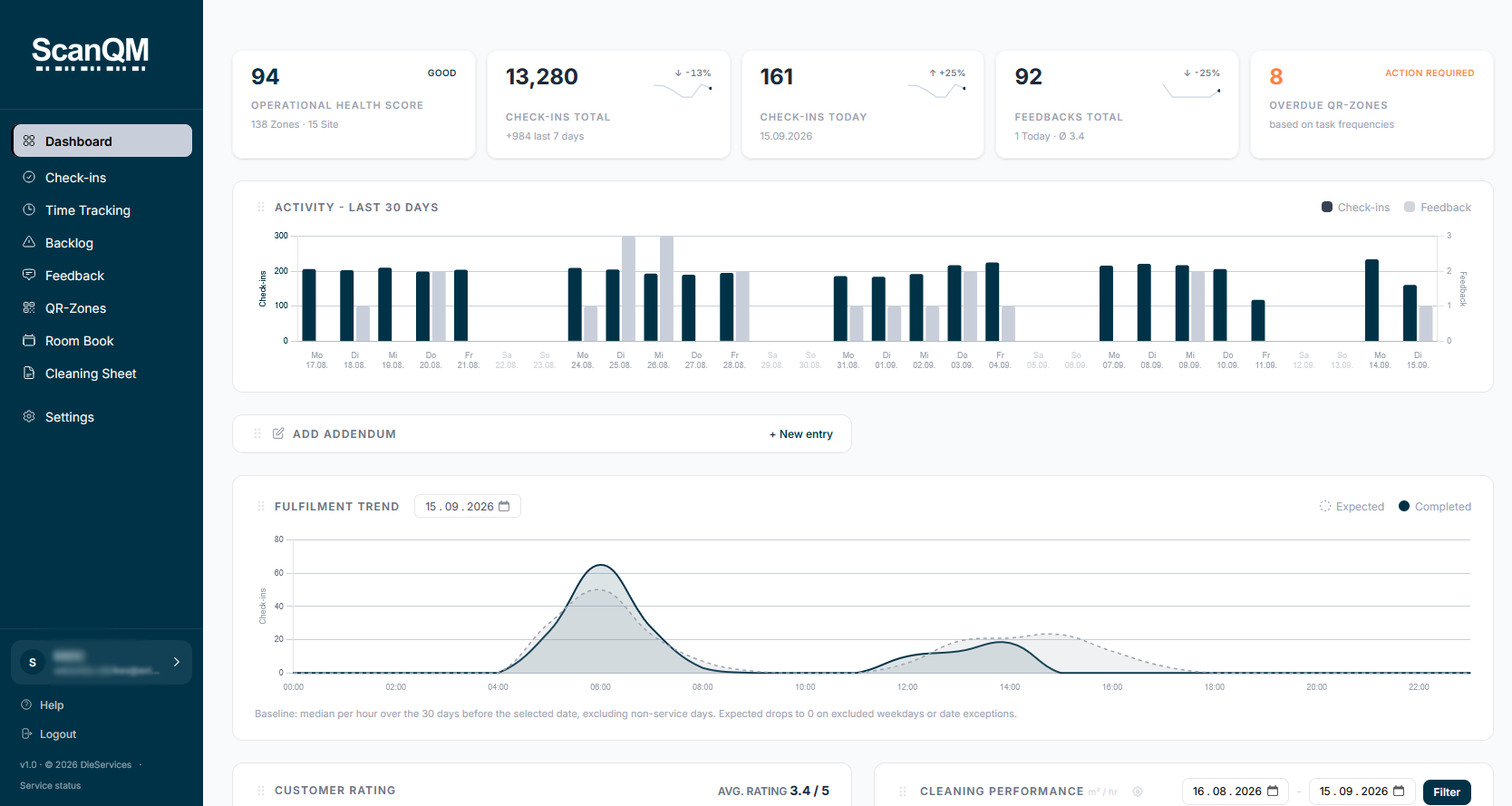
Real-time dashboard
Overview of all locations, zones and staff: fulfilment rate, overdue zones and customer ratings. Manual entries are possible directly.
Email alerts
For fault reports, negative feedback or service reports, configurable recipients get an email immediately, with context and photo.
Resolution notes
Every report can carry a note: in the admin or via a token-based link from the email, no login. The resolution is documented.
Time tracking & backlog
Time tracking per service and an overview of overdue zones based on service frequencies.
PDF & XLSX export
Service reports as PDF with logo, signatures and photos; feedback and report overviews as XLSX, filterable by date, zone and location.
Privacy & pseudonymization
Staff names can be pseudonymized in external outputs such as emails and web views. GDPR-compliant and configurable per tenant.
Own environment per customer
Every customer gets an isolated environment with its own subdomain and database, with own language, branding and location structure.
From paper to proof in four steps
Attach QR stickers
In restrooms, offices, changing rooms, equipment areas and elsewhere, each zone gets its own code.
Scan & confirm
Staff check in via QR scan and confirm the service round with one click, optionally with photo and signature.
Guests report directly
Guests scan the same code and give feedback. The team gets an email with context right away.
Note & prove
Add a resolution note, check the dashboard and export the service report as PDF.
Also as an app: the ScanQM app for iOS and Android
What makes your staff's daily work easier
Tasks in their native language
Tasks are displayed in each staff member's own language, which means fewer misunderstandings and fewer follow-up questions.
Offline support
Caching keeps work possible even with poor or no reception, for example in basements or restroom wings.
Recording of time on task
The time a service takes is recorded, as a basis for planning and proof.
Report anomalies & defects directly
Faults and damage can be reported on the spot, with free text and a photo, even without a QR scan.
Task list per zone
A task list can be stored for each zone. Staff see what needs doing as soon as they check in.
Photo, signature & status in one click
The service round is confirmed with one click, optionally with photo, signature and status note.
ScanQM vs. typical QR-check tools
QR-based tools document service rounds. ScanQM connects the proof with direct guest feedback and documented follow-up.
| Feature | ScanQM | Typical QR-check tools |
|---|---|---|
| Digital proof of service via QR scan | Yes | Yes |
| Guest feedback on the same QR code | Yes | Not always included |
| Email alert on negative feedback | Yes, in real time | Varies by provider |
| Resolution note via link, no login | Yes | Varies by provider |
| Pseudonymization of staff names | Yes, configurable | Varies by provider |
| Hosting & compliance | Germany, ISO 27001 data center, GDPR | Varies by provider |
General market comparison, not a statement about any specific provider. As of 2026.
Pricing by scope: zones, locations and staff
From a free start to enterprise rollout.
Trial
- 5 QR zones
- 1 location
- 3 staff members
- Time tracking
- Backlog
- Room book
- Scheduled reports
- Area performance (m²/h)
Host
For vacation rentals, Airbnb and apartments
or €29/year (save 19%)
- 5 QR zones
- 1 location
- 2 staff members
- Backlog
- Room book
Light
or €90/year (save 17%)
- 10 QR zones
- 1 location
- 2 staff members
- Backlog
- Room book
- Scheduled reports
Starter
or €290/year (save 17%)
- 20 QR zones
- 3 locations
- 5 staff members
- Time tracking
- Backlog
- Room book
- Scheduled reports
Pro
or €790/year (save 17%)
- 75 QR zones
- 15 locations
- 25 staff members
- Time tracking
- Backlog
- Room book
- Scheduled reports
- Area performance (m²/h)
Business
or €1,490/year (save 17%)
- 250 QR zones
- 50 locations
- 75 staff members
- Time tracking
- Backlog
- Room book
- Scheduled reports
- Area performance (m²/h)
- Custom branding
Enterprise
Do you have more than 50 locations, your own IT requirements or special integration needs? We build enterprise packages individually, for example with API interfaces, on-premise hosting, dedicated support and tailored reports. Get in touch.
- Unlimited QR zones
- Unlimited locations
- Unlimited staff members
- Time tracking
- Backlog
- Room book
- Scheduled reports
- Area performance (m²/h)
- Custom branding
Frequently asked questions
What is a digital cleaning record?
What does a digital record offer over paper and Excel?
What sets ScanQM apart from other QR-check tools?
Do guests or staff need an app and which devices are supported?
Does ScanQM work without an internet connection?
How do I set up ScanQM?
Can photos and signatures be captured?
Can defects and anomalies be reported directly?
What happens if a service is forgotten?
Can I manage several locations?
In which languages are tasks displayed?
Can I use ScanQM with my own branding?
How long am I bound by contract?
What does ScanQM cost?
Is there a free trial?
Do I need to install anything to use ScanQM?
Is ScanQM GDPR compliant and where is the data stored?
What happens to my data after the contract ends?
How do I reach support?
Who is ScanQM for?
Is ScanQM suitable for small businesses too?
Is there an API or interfaces to other systems?
Replace the paper sheet today
Book a free demo and see how the digital restroom cleaning log with guest feedback works in your operation.